Show Powerpoint Slideshow Presentation on your Digital Signage Menu
Most of Corn Digital's clients are already using PowerPoint to create their digital signage contents; however, with Microsoft's 2010 PowerPoint's new video featuresour clients can now get more creative with their contents.
65" Digital Poster at Roman Times, a watch store in Caesars Palace Las Vegas, LV
Microsoft’s PowerPoint 2010 came in with a new feature allowing users to save presentation as a Windows Media Video (.wmv) file. With this user-friendly tool our clients can now distribute their Slideshows directly to the digital media player as it is on their computer without using any conversion tools or losing any animated, narrated, multimedia effects. Most of our clients are already using PowerPoint to create their digital signage contents; however, with the new feature our clients can now get more creative with their contents. One example here is Roman Times, a watch store in Caesars Palace Las Vegas, LV, showing a PowerPoint converted video on a 65” display. The result of these beautiful watches turned out just stunning!
Here are some tips on how to create high quality videos (or images) for the digital signage and menu boards. If you need assistance converting your file feel free to contact Corn Digital for free consultation and conversion.
For 16:9 Aspect Ratio Content
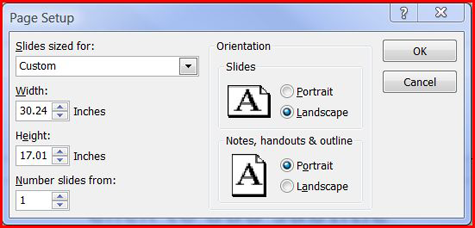
Most screens are 16:9 aspect ratio. Some of our point of purchase screens are 4:3 aspect ratio. The default for PowerPoint slides is 4:3 so if you have a big screen monitor or TV you need to set your PowerPoint page size to fit your screen before you start.
Set PowerPoint slide Width and Height under Page Setup to 30.24 ” x 17.01″ (76.8 x 43.2 CM) for better quality. This gives you the correct aspect ratio and a big page to work with so your slides and text will be sharp.
PowerPoint 2003: File → Page Setup
PowerPoint 2007 & 2010: Design → Page Setup
For 4:3 Aspect Ratio Content
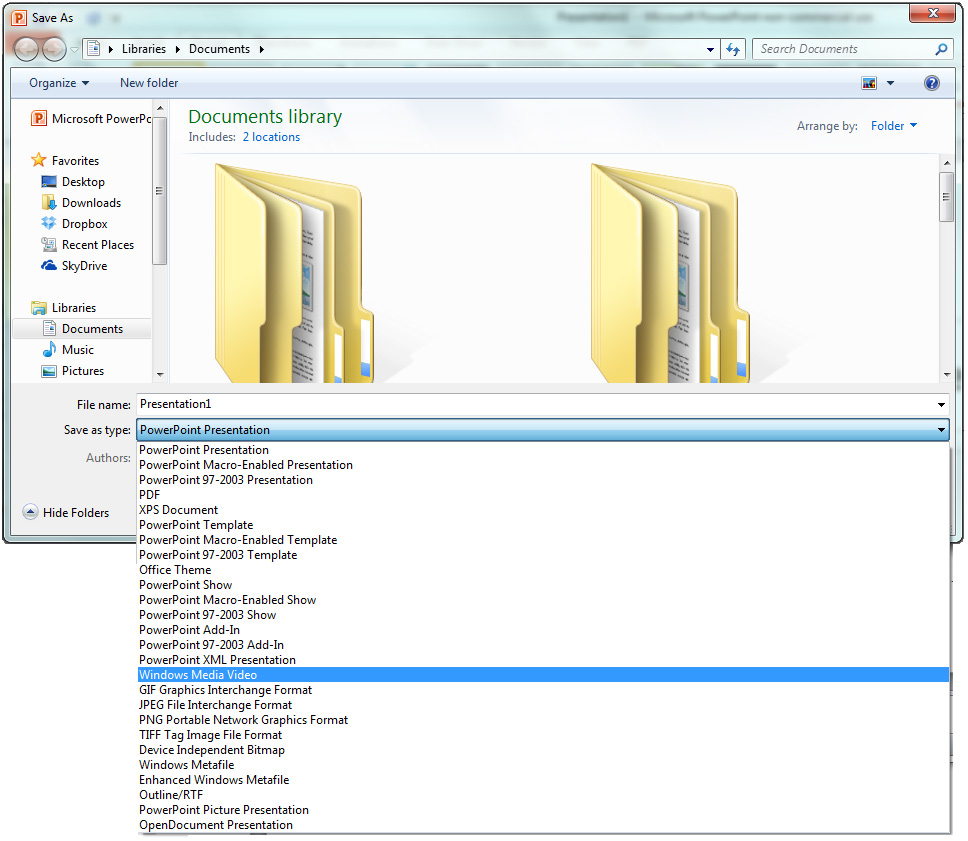
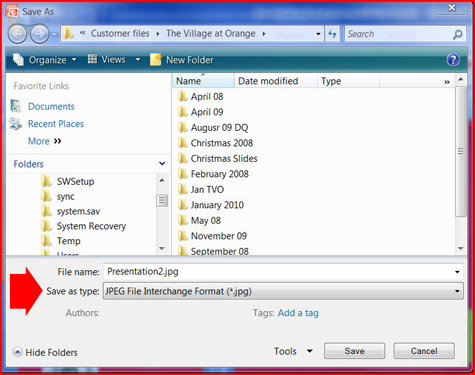
For 4:3 aspect ratio screens; set PowerPoint slide Width and Height under Page Setup to 22.68″ x 17.01″ (57.6 x 43.2 CM) for better quality. When your slide show is finished chose Save As; and select “Windows Media Player” if you are using Microsoft Powerpoint 2010; or “JPEG File Interchange Format (*.jpg)” if you are using other versions.
Save Your Presentation as Video (only available on Powerpoint 2010):
Save as Images
PowerPoint will ask you if you want to save one slide or all the slides in your presentation.
Your PowerPoint slides are now ready to be sent to the network or copied onto a memory card to display on your signs.